Albania
 Argentina
 Australia
 Austria
 Belgium
 Bosnia and Herzegovina
 Brazil
 Bulgaria
 Canada
 Chile
Chile
 Colombia
 Croatia
 Czech Republic
 Denmark
 Estonia
 Finland
 France
 Germany
 Greece
 Hungary
 Ireland
 Italy
Italy
 Latvia
 Lithuania
 Luxembourg
 Mexico
 Moldova
 Montenegro
 Netherlands
 New Zealand
 North Macedonia
 Norway
 Philippines
 Poland
 Portugal
 Romania
 Serbia
 Slovakia
 Slovenia
 South Africa
 Spain
Spain
 Sweden
 Switzerland
 Turkey
 Ukraine
 United Kingdom
 United States of America



Wireless Systems for Guitar and Bass
A wireless guitar or bass system replaces the instrument cable between your instrument and amplifier, pedalboard or other audio equipment. It allows freer movement on stage and removes one cable from the performance area, but still needs to maintain a reliable connection and suitable input level. A set contains a transmitter and receiver; systems differ in operating band, connectors, power, latency and mounting method. Before choosing, check the pickup type, receiver position in the setup and wireless-frequency regulations.
Where to place the receiver
The simplest path runs from the instrument to the transmitter, by radio to the receiver and then into the amplifier input. With a pedalboard, the receiver usually sits at the start of the chain in place of the guitar cable. Its output must suit an instrument input and its level must not overload the next effect. A rack receiver may need a separate cable to the pedalboard.
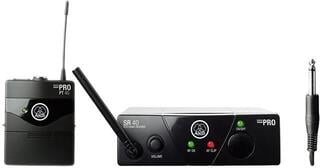
Some compact systems have a transmitter shaped as a plug. This removes the belt cable and clip, but you must check clearance around a recessed or angled socket. A rotating design adapts more readily to different instruments. A bodypack transmitter uses a short cable with the correct connector and secure strain relief.
| Design | Advantage | What to check |
|---|---|---|
| Plug-in transmitter | Quick connection without a cable to your belt | Socket shape, body clearance and stress on the connector |
| Bodypack transmitter | Secure mounting and replaceable short instrument cable | Connector type, clip, cable routing and input sensitivity |
| Pedal receiver | Fits a pedalboard and may add tuning or signal splitting, depending on the model | Size, power, antenna position and output level |
| Rack receiver | Organised setup for several systems | Antenna distribution, transport and routing to the stage |
Active and passive pickups
Test with the instrument you play
Instruments with passive pickups respond to input impedance, and an unsuitable connection may change the treble or playing feel. Active electronics can deliver a stronger signal that requires enough input headroom. Test the system with your actual guitar or bass and your hardest playing. Set the sensitivity switch according to the instructions, not simply to whichever position sounds louder.
A piezo pickup may have different requirements from a magnetic one. Follow any manufacturer restrictions for particular instruments or connections. When comparing against a cable, match perceived volume; a louder feed can easily appear fuller. Listen to clean and distorted sound, note decay and the response when turning down the instrument volume.
Latency and digital transmission
A digital system takes time to convert and transmit the signal. One small latency figure may not hinder playing, but delays from several digital devices add together. If the wireless system feeds a digital multi-effect, mixer and digital monitor path, assess the whole chain. For timing-sensitive playing, test the actual setup rather than the receiver alone.
Operating band and multiple systems
Wireless transmission must use a band permitted in the country and suitable for the venue. Some instrument systems share spectrum with other devices, so local congestion can affect stability. UHF versions require checking the specific frequency range. Verify regulations again before travelling to another country.
With one guitar, automatic channel selection may be enough for a simple setup. Several instrument and microphone systems require joint coordination. Switch on every device, scan at the venue and assign channels instead of experimenting during the concert. Do not hide receivers and antennas under metal objects or beside interference sources.
- Range measured in an open space may not reflect a complex stage.
- Allowing a margin is more reliable than planning movement at the edge of reception.
- Multiple available channels do not mean that all can operate together at every venue.
- Where possible, test wireless operation with all equipment, lights and networks switched on.
Power for the whole programme
A transmitter may use replaceable batteries or a built-in rechargeable battery. Replaceable cells can be swapped quickly; an integrated battery charges without opening the case. Programme length, breaks and charging access determine the better option. Treat stated runtime as conditional and prepare a reserve.
A pedal receiver may need its own adapter or a suitable output from a pedalboard power supply. Check voltage, polarity and required current. Secure the power connector against being pulled out and do not use a mechanically unsuitable replacement charging cable. Check battery status before the soundcheck and again before the performance.
Mechanical use and transport
The transmitter must not strike the instrument during movement or strain its socket. For a bodypack, use a dependable clip or pouch and route the short cable with some slack. Test a plug-in model while standing and sitting. Remove the transmitter before placing the guitar on a stand so it cannot rest against the floor or frame.
Protect connectors and antennas in a rigid case during transport. Label spare batteries, the adapter and short cable as parts of the system. Keep a conventional instrument cable in the rig as a quick backup. If the wireless link behaves unpredictably during an event, switching to cable is often safer than troubleshooting in front of the audience.
Wireless system versus cable
A cable needs no battery or radio channel and is highly predictable over a short run. Wireless adds movement and can reduce tangles on stage, but also introduces power, coordination and more connectors. In a studio where you stand beside the amplifier, it may offer no practical benefit. On a large stage or when switching instruments often, it can simplify the workflow considerably.
If an unbalanced instrument signal must travel farther by cable, a suitable DI box may help, depending on the destination. It does not replace a wireless transmitter; it addresses another part of the signal path. Draw the route to the amplifier or console for either solution.
Test before choosing
- Check the instrument socket, pickup type and strongest output level.
- Choose the receiver position and add up the latency of other digital devices.
- Check the permitted band and other wireless systems in the setup.
- Test movement around the stage, transmitter mounting and actual programme length.
- Compare the sound at equal volume with a good cable and keep it as backup.
If you move between the pedalboard, microphone and edge of the stage during a concert, wireless removes one cable run. In a studio or when playing beside the amplifier, an ordinary cable may be simpler. Wireless stability comes from compatibility, frequency planning and power, not the name printed on the receiver.