Albania
 Argentina
 Australia
 Austria
 Belgium
 Bosnia and Herzegovina
 Brazil
 Bulgaria
 Canada
 Chile
Chile
 Colombia
 Croatia
 Czech Republic
 Denmark
 Estonia
 Finland
 France
 Germany
 Greece
 Hungary
 Ireland
 Italy
Italy
 Latvia
 Lithuania
 Luxembourg
 Mexico
 Moldova
 Montenegro
 Netherlands
 New Zealand
 North Macedonia
 Norway
 Philippines
 Poland
 Portugal
 Romania
 Serbia
 Slovakia
 Slovenia
 South Africa
 Spain
Spain
 Sweden
 Switzerland
 Turkey
 Ukraine
 United Kingdom
 United States of America



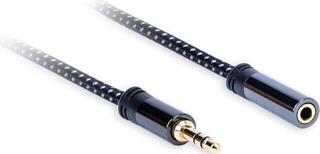
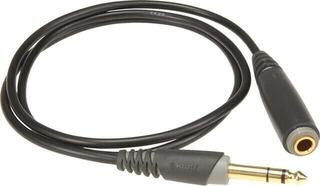
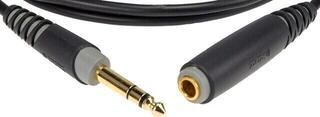
Hi-Fi Extension Audio cables
Hi-Fi audio extension cables are used to extend an existing analogue audio connection between a sound source and a receiving device. You can use them when the original cable does not reach an amplifier, speakers, headphones, or another audio device. When choosing one, check the connector at both ends, the required length, and how the cable will be routed. The right choice mainly depends on the sockets of the devices being connected and the specific setup.
Hi-Fi Audio Extension Cables
An audio extension cable has a connector at one end for attaching the original cable and a connector at the other end that plugs into the destination device. A typical design combines a female and male connector of the same format, but do not rely only on the connector name before buying. Also check the number of contacts, stereo or mono wiring, and the physical design of the socket. The connector must match both sides of the connection without needing to be forced in.
An extension is useful when moving your listening position, routing a cable behind furniture, or connecting devices placed farther apart. If you do not need a male-to-female extension but a standard connection between two devices, also see AUX cables. The distinction between an interconnect and an extension cable is important: an interconnect usually has connectors intended to plug directly into two sockets, while an extension cable continues an existing cable.
Comparison of Connectors and Uses
| Design | What to check | Typical use |
|---|---|---|
| Male jack – female jack | Connector diameter, number of contacts, and mono or stereo wiring | Extending a headphone cable or another connection with the corresponding jack |
| Male RCA – female RCA | Number of separate channels and identification of the left and right branches | Extending an analogue connection between audio components |
| Pair of connectors on both sides | Matching of all branches, connection direction, and colour coding | Carrying the left and right channels in one cable pair |
| Adapter design | Different connectors at each end and contact wiring | Situations where the physical connection format must be changed as well as extended |
Connectors looking similar does not necessarily mean that the extension is suitable. Check the device socket, the connector on the original cable, and the required connector at the far end. If a jack has multiple contact segments, compare their number on both the original cable and the extension. With paired RCA connectors, maintain the left and right channel assignment along the entire route.
How to Determine the Right Length
Do not measure the length only as the direct distance between the devices. Account for the route along a wall, behind a desk, or around furniture, the space needed to insert the connector, and a little slack for handling. The cable should not be taut between the sockets, as tension may be transferred to the connector or device port. At the same time, do not choose an unnecessarily large allowance if the excess cable would remain in a walkway or form a messy bundle.
Before measuring, plan the actual route. Measure along the intended path and include curves around corners. If you regularly move the device, leave enough slack for normal handling without pulling the connection apart. Position the joint between the original cable and the extension where it is accessible for inspection but not where people walk.
Safe and Practical Audio Cable Routing
- Route the cable away from main walkways and places where someone could trip over it.
- Do not place it under furniture legs or pinch it in doors or drawers.
- Make a gentle curve at corners and do not bend the cable sharply.
- Disconnect a connector by gripping its body, not by pulling the cable.
- Arrange excess length loosely and without tight bends.
- Do not leave the connector joint in a damp environment or where it is exposed to mechanical stress.
- Label multiple cables so that you disconnect the correct connection when changing the setup.
After connecting, check that the connectors are inserted straight and securely. If the cable becomes taut during normal movement of furniture or the device, adjust its route or the amount of slack. Do not prop up a loose connection with objects or secure it in a way that puts pressure on the device socket.
Checklist Before Choosing
- Identify which two parts of the existing audio connection you need to move farther apart.
- Check the name, shape, and size of the original cable's connector.
- Check the connector at both ends of the extension cable, not just one.
- Compare the number of contacts and determine whether the connection uses mono, stereo, or additional contacts.
- For an RCA connection, count the required branches and maintain the left and right channels.
- Measure the entire planned route, including paths around furniture and corners.
- Add suitable slack so the connectors are not subjected to tension.
- Choose a joint location that does not obstruct walking and remains accessible for inspection.
- Plan how to arrange excess length without crushing or sharp bends.
- Before use, check that both ends are firmly inserted and the entire route is safely arranged.