Albania
 Argentina
 Australia
 Austria
 Belgium
 Bosnia and Herzegovina
 Brazil
 Bulgaria
 Canada
 Chile
Chile
 Colombia
 Croatia
 Czech Republic
 Denmark
 Estonia
 Finland
 France
 Germany
 Greece
 Hungary
 Ireland
 Italy
Italy
 Latvia
 Lithuania
 Luxembourg
 Mexico
 Moldova
 Montenegro
 Netherlands
 New Zealand
 North Macedonia
 Norway
 Philippines
 Poland
 Portugal
 Romania
 Serbia
 Slovakia
 Slovenia
 South Africa
 Spain
Spain
 Sweden
 Switzerland
 Turkey
 Ukraine
 United Kingdom
 United States of America



Audio receivers and transmitters
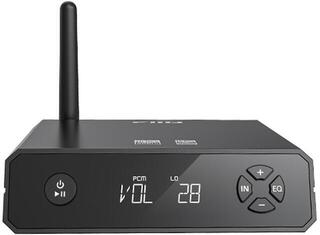
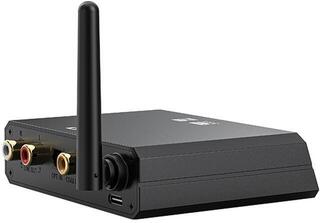
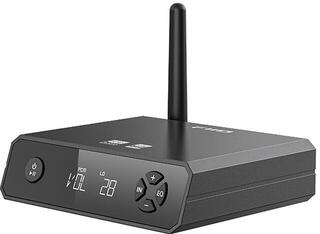
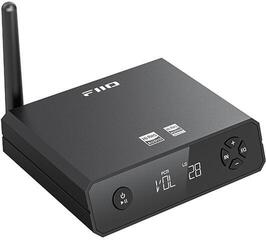
Audio receivers and transmitters are used to transfer an audio signal between a source and a target device. A transmitter takes the signal from the source and sends it onwards, while a receiver captures it and passes it to the device that plays or processes the audio. The two functions may be provided by separate devices or combined in a single device with a switchable mode. When choosing one, first determine the direction of transmission and the connectors on both sides.
Audio receivers and transmitters
The signal source may be a television, computer, player, mixing console or another device with an audio output. The target is often a pair of headphones, speakers, an amplifier, a car stereo, a recorder or another part of an audio system. What matters is not only which devices you want to transfer audio between, but also the direction in which the signal needs to travel.
An audio transmitter connects to the source. It receives audio through an available input, processes it and transfers it to a receiver or directly to a compatible target device. A typical example is sending audio from a television to wireless headphones. An audio receiver, by contrast, connects to the target and delivers a signal from the source device to it, for example from a phone to an amplifier.
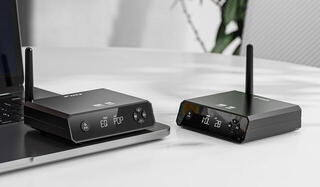
With a combined receiver and transmitter, you select the appropriate mode before use. Such a device does not change the basic principle: in transmitter mode it must be connected to the source, and in receiver mode to the target. Mode labels, switching methods and available interfaces may vary between models.
Difference between a receiver and a transmitter
| Device type | Where it connects | Signal direction | Example use |
|---|---|---|---|
| Audio transmitter | To the audio source | From the source to the receiving device | Transferring audio from a television to wireless headphones |
| Audio receiver | To the target audio device | From the transmitting device to the target | Playing audio from a phone through an amplifier or speakers |
| Receiver and transmitter in one | To the source or target, depending on the selected mode | Determined by the active mode | Alternating between sending and receiving audio |
The table compares the role of the devices, not their audio quality or range. These depend on the specific solution, the transmission method used and the conditions in the space. Before ordering, refer to the input, output and mode labels on the selected model.
Wireless audio transmission
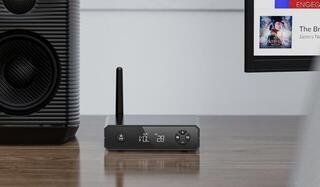
A wireless audio solution reduces the need to run a signal cable between the source and the target. However, a cable may still be needed to connect the transmitter to the source, the receiver to the speakers or to provide power. Wireless therefore primarily describes the method of transmission between devices, not necessarily an entirely cable-free setup.
The transmitter and receiver must use mutually compatible methods of communication. The mere presence of a wireless function does not confirm that two specific devices will connect or that they support the same audio transmission mode. Check compatibility in the documentation for both sides of the setup.
When watching video, gaming or working with audio, the delay between the source and playback may be important. Its duration cannot be determined solely from whether a device is a receiver or transmitter. Check the specifications of the particular devices and consider the entire transmission chain, as the source, transmitter, receiver and target can all affect the result.
Connecting the source and target
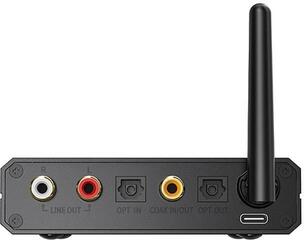
First, check the audio output of the source device. Then find out which input the transmitter or combined device provides in the appropriate mode. At the other end of the transmission, follow the reverse process: the receiver must have an output that you can connect to the input of the speakers, amplifier, car stereo or another target.
Interfaces with the same shape do not always carry the same type of signal, and an input cannot automatically be used as an output. Pay attention to connector labels and signal direction. If the setup uses both digital and analogue audio, also check whether the selected device supports the required input and output methods; this capability cannot be assumed for every model.
What to check before choosing
- Determine which device is the audio source and which is the target.
- Decide whether you need to transmit, receive or switch between both modes.
- Compare the source output with the transmitter input and the receiver output with the target device input.
- Check whether all components support the same wireless transmission method and the required audio mode.
- Check the power supply method and consider where the device can be placed.
- If you are connecting multiple devices, check how they are paired and how you switch between them.
- When using it with video or interactive audio, check the stated delay for the entire setup.
- Check the controls, mode labels and reconnection procedure.
How to build a suitable signal chain
- Make a note of the device that the audio comes from and its available audio output.
- Identify the device on which you want to listen to or further process the audio, along with its input.
- Choose a transmitter, receiver or combined model to place between them according to the signal direction.
- Compare the wired interfaces at both ends as well as the method of wireless communication.
- Before use, set the correct mode, connect the source and target, and pair them according to the device instructions.
This process helps separate three different questions: where the audio comes from, where it is going and how it will be transferred between the devices. Neither a receiver nor a transmitter determines the characteristics of the entire audio setup on its own. Assess compatibility and any potential delay based on the specific combination of source, transmission devices and target.